

SafePal's flagship air-gapped hardware wallet for securing more than 200 blockchains with maximum isolation, a color display, and a battery that lasts for weeks.
What is the SafePal S1?
The SafePal S1 is SafePal’s flagship hardware wallet, and has been one of the leading devices in the self-custody market since its launch. Unlike many competitors that rely on USB or Bluetooth connections, the S1 takes a radically different approach: zero wireless or wired connectivity for signing transactions. The entire authorization process is carried out using QR codes scanned through the device’s built-in camera, keeping private keys completely isolated from the outside world at all times.
This air-gapped philosophy is not just a marketing slogan. It is a design decision that permeates every aspect of the device, from the deliberate absence of Bluetooth, Wi-Fi, NFC, or a functional USB connection for signing, to the EAL6+ security chip that safeguards the keys without the possibility of direct extraction.
SafePal as a company: background and support
Before getting into the technical details, it’s worth providing some background on the company. SafePal was founded in 2018 with a clear goal: to make self-custody of cryptocurrencies accessible to the average user, without sacrificing security. The support from Binance Labs in its early stages was not merely symbolic; it opened the door to a global distribution network and accelerated the development of a software ecosystem that is now one of the strengths of the offering.
The company is led by Veronica Wong, one of the few female CEOs at the helm of a crypto infrastructure company with a genuine global presence. This fact is not merely anecdotal: it speaks to a leadership structure with its own vision in a sector that remains highly homogeneous in terms of leadership.
What matters to the end user is that behind the S1 there is a team that provides regular firmware updates, 24-hour technical support, and an actively developed mobile app that goes far beyond the basic functionality of a hardware wallet.
Did you know that…? SafePal was the first hardware wallet backed and incubated by Binance Labs, one of the most important investment funds in the crypto sector.
Design and hardware: the pocket calculator that stores your crypto
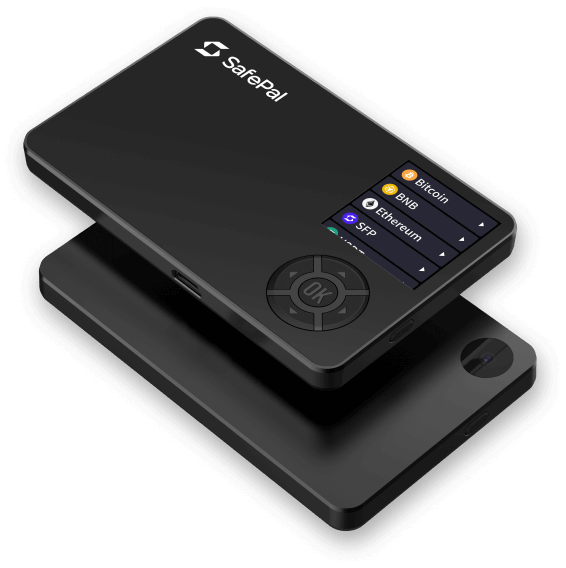
The SafePal S1 is about the size of a credit card, making it one of the most portable devices in its category on the market. Its ABS and PVC casing is lightweight and durable enough for everyday use, although it doesn’t quite match the build quality of higher-end models made with metal alloys. For anyone looking to carry it in their wallet or pocket without worrying about it taking up space, the S1 is a perfect fit.
The most noticeable distinguishing feature at first glance is its 1.3-inch color IPS display with a resolution of 320×320 pixels. In this regard, the S1 clearly outperforms direct competitors such as the Ledger Nano S Plus (0.83-inch monochrome LCD screen) or the Trezor Model One (0.96-inch monochrome screen). Viewing transaction details, the destination address, or the wallet balance on a color screen—even a small one—significantly improves the user experience compared to the competitors’ black-and-white screens.
The built-in camera deserves special mention: it is the central component of the entire signature system. It is designed to scan QR codes at high speed and works well even in less-than-ideal lighting conditions. Without it, the S1 simply cannot function as a hardware wallet, which also means you need to take good care of it.
Box contents
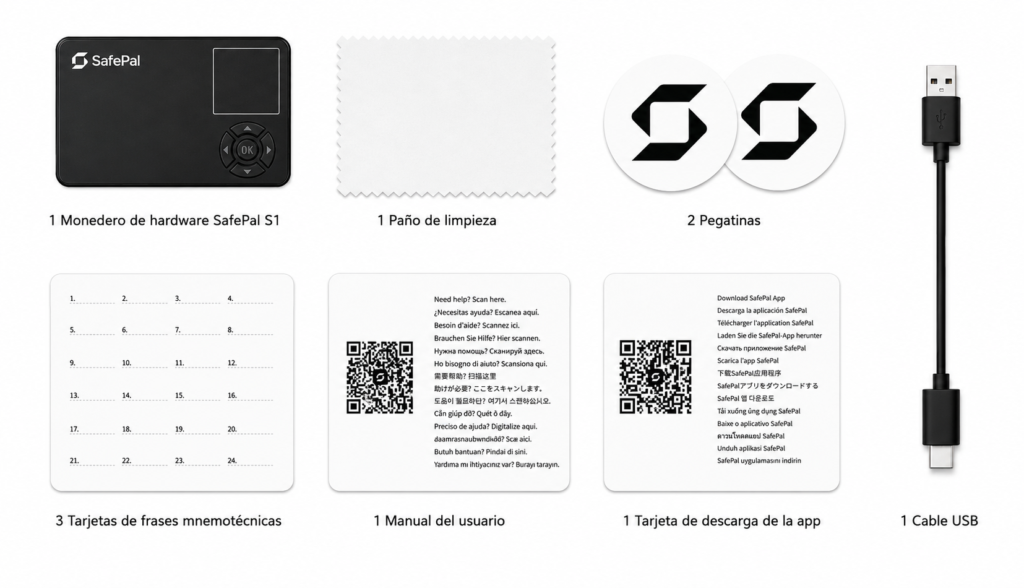
The SafePal S1 comes with everything you need right out of the box:
- SafePal S1 Hardware Wallet
- 1 USB cable (for charging only)
- 3 mnemonic phrase cards
- 1 app download card
- 1 user manual
- 1 cleaning cloth
- 2 stickers
The three cards for recording the seed phrase are a practical and important feature: SafePal recommends storing copies in different physical locations to protect against loss, fire, or other unforeseen events. A single point of failure for recovering funds is a risk not worth taking.
Battery: The Big Advantage Over the Competition
One of the SafePal S1’s strongest selling points is its 400 mAh battery, which—with standard use of about 10 minutes per day—can last up to 20 days on a single charge. This puts it in a completely different category from devices like the Ledger Nano X, which requires regular charging, or even the SafePal X1 itself, whose two hours of continuous use are limited for intensive sessions.
Charging is done using the USB cable included in the box. The port is not used for signing transactions, which reinforces the device's complete isolation: the cable is used exclusively for charging the battery—nothing else.
For users who manage their portfolios on a regular basis but not every day, the S1 offers the peace of mind of being able to pick it up whenever they need it without having to worry about whether it has enough battery life.
Security: At the Heart of Everything
For any hardware wallet, security isn't just another feature on the list of specifications; it's the very reason the product exists. The SafePal S1 builds its security model on several layers that are important to understand thoroughly.
EAL6+ security chip
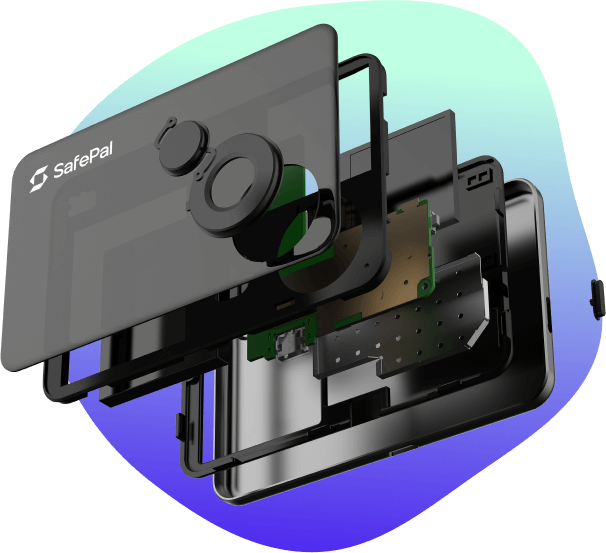
The device incorporates an EAL6+ certified security element (Common Criteria), the same standard used in biometric passports and high-security payment systems. This certification guarantees that the private key is generated, stored, and operated within the chip without the possibility of direct physical extraction, even by an attacker with physical access to the device and specialized tools.
100% air-gapped signing system
This is the feature that sets the S1 apart from all others. The signing process works as follows: the SafePal app on the smartphone generates a QR code containing the unsigned transaction data; the S1 scans that code with its camera, processes and signs the transaction on the secure chip, and generates a new QR code with the signed transaction; the app scans it and sends it to the network. At no point is there a direct connection between the device and the smartphone, the internet, or any other system.
The practical implications are clear: no Bluetooth, no Wi-Fi, no NFC, no functional USB for data. There is no remote attack surface. There is no wireless attack vector. The only way to compromise the keys would be through direct physical access to the device with the PIN.
Additional layers of protection
- True Random Number Generator (TRNG): The seed is not generated using pseudorandom algorithms, but rather through actual hardware entropy, ensuring its unpredictability.
- Multiple security sensors: distributed throughout the device to detect attempts at physical tampering or unauthorized opening.
- Tamper-resistant self-destruct mechanism: If an attempt to physically access the interior of the device is detected, it triggers a process that renders the stored data irrecoverable.
- Optional passphrase: In addition to the standard seed phrase, the user can add an extra layer of security using a custom passphrase. Even if the seed is exposed, the funds remain inaccessible without the passphrase.
Important Note: Always purchase the S1 through official channels and verify that the device arrives sealed before activating it. Any prior tampering may compromise security from the very first use.
Air-gapped: What It Means in Practice
The concept of air-gapped device is often mentioned in the world of hardware wallets, but it isn't always explained clearly. In the case of the S1, it means that private keys never leave the device's secure chip under any circumstances.
When using a Bluetooth or USB wallet for signing (such as a Ledger Nano X or the SafePal X1), what is transmitted over that connection is the already-signed transaction, not the private key itself. The level of security remains high. But in the case of the S1, that communication channel doesn’t even exist: the transaction is exchanged solely through visual representations (QR codes) that the device scans without establishing any kind of active connection.
For users with the highest security requirements—especially those who hold significant amounts of money or are at higher risk—this complete isolation can be a deciding factor.
SafePal S1 vs. SafePal X1: Which One Is Best for You?
Comparing the S1 and the X1 is the most important step for anyone choosing a device from the SafePal lineup. They represent two different approaches to self-custody, and the right choice depends on your usage profile rather than on technical specifications.
| Characteristic | SafePal S1 | SafePal X1 |
|---|---|---|
| Price | $49,99 | $69,99 |
| Connection method | Offline (QR code + camera) | Bluetooth 5.0 |
| Open source | No (closed-source firmware) | Yes |
| Security chip | EAL6+ CC | EAL6+ CC |
| Screen | 1.3-inch color IPS (320×320) | 1.8-inch monochrome LCD (128×64) |
| Self-destruct mechanism | Yes | Yes |
| Battery | 400 mAh (~20 days with standard use) | 200 mAh (~2 hours of continuous use) |
| Buttons | D-pad | 12 buttons + D-pad |
| Housing material | ABS + PVC | ABS + PVC |
| Supported blockchains | 200+ | 200+ |
| Passphrase | Yes | Yes |
The most significant difference between the two is not in their underlying security, but rather in connectivity architecture and usage philosophy.
The S1 is designed for total isolation: the QR-based signing process is slower and requires a few additional steps, but it eliminates any wireless attack vectors. The X1 prioritizes convenience: Bluetooth greatly streamlines the signing process and reduces friction, especially for frequent users. Both store keys on an EAL6+ chip, and both prevent the direct extraction of private keys.
There are two areas where the S1 clearly comes out on top: the color screen offers a superior visual experience, and the battery has much longer battery life. The X1, on the other hand, is the only one of the two that is open source and is more user-friendly in terms of day-to-day use.
Which one to choose?
→ The SafePal S1 is the ideal choice if you prioritize maximum air-gapped isolation, value a color screen, and need long battery life. It’s also the more affordable of the two, making it a very solid entry point into the world of self-custody.
→ The SafePal X1 is the best choice if Bluetooth convenience is a priority for you, you value the transparency of open-source software, or you sign transactions very frequently and want to minimize friction.
Where can I buy the SafePal S1?
We recommend purchasing it exclusively through the official SafePal store or from its verified official distributors. Purchasing from third-party marketplaces or unauthorized resellers carries the risk of receiving a device that has been tampered with, which would compromise security from the very first use.
The official store accepts multiple payment methods:
- Credit or debit card
- PayPal
- Payment in cryptocurrency
- Binance Pay
The price is $49.99 excluding VAT and duties. SafePal offers free shipping when you purchase two or more units (excluding the leather case and expedited shipping), which may be appealing to those who want a backup or to split shipping costs with someone they trust. The warranty is valid for one year from the date of activation, with 24-hour customer support available.

SafePal S1
| Score | |
| Price | $49.99 |
| Launch | 2019 |
| Screen | 1.3-inch IPS · 320×320 px · Color |
| Battery | Up to 20 days with 10 minutes of use per day |
| Load | USB port (charging only) |
| Connectivity | No Bluetooth, Wi-Fi, NFC, or USB data |
| Signature | 100% air-gapped vía QR codes |
| Camera | QR scan integrated |
| Compatibility | +200 blockchains |
| Security chip | EAL6+ CC |
| Code | Proprietary firmware |
Setup and Getting Started: A Practical Guide
The setup process for the SafePal S1 is intuitive and well-documented, although the QR signature system has an initial learning curve that you should be aware of beforehand.
1. Verifying the device's authenticity. When you open the box, the first thing to do is confirm that the device has not been tampered with. The S1 includes an authentication process that can be completed by scanning a code or following the steps outlined on safepal.com. Do not skip this step.
2. Download the SafePal app. The app is available on the Apple App Store and Google Play, as well as in APK format for Android. It serves as the central hub for managing assets, initiating transactions, and accessing features such as swaps, DApps, and the banking gateway.
3. Creating the wallet and the seed phrase. Once the device is turned on, the process of generating the mnemonic phrase begins directly on the secure chip, without ever leaving the device. You can choose between 12, 18, or 24 words; 24 words is the most robust standard and the one recommended for significant amounts. Write down the phrase on the included cards and store them in secure, separate physical locations. This phrase is the only way to recover your funds: losing it means losing access permanently.
4. Pairing the device with the app. Instead of a Bluetooth or USB connection, the S1 is paired with the app by scanning a QR code from the app. The process takes a few minutes and only needs to be done once.
5. First signing cycle. The first transaction is the best time to understand the workflow: the app generates a QR code with the unsigned transaction, the S1 scans it with its camera, reviews the data on the screen, the user confirms on the device, and the S1 generates a new QR code with the signature ready for the app to broadcast to the network. These are additional steps compared to a USB wallet, but they quickly become second nature.
What happens if I lose my SafePal S1? Your funds are not stored on the device, but on the blockchain. Without the seed phrase and PIN, no one can access your funds even if they have the device in their possession.
Who is the SafePal S1 for?
The S1 isn't a device for everyone, and that's not a flaw—it's the result of clear and deliberate design choices.
It's a good fit for:
- Users seeking the highest level of isolation and wanting to eliminate any wireless or wired attack vectors during the signing process.
- Long-term holders who do not make high-frequency transactions and value the peace of mind that comes from knowing their private keys have never been exposed to an active connection.
- Those who manage diversified portfolios across multiple blockchains and need comprehensive support without paying for a high-end device.
- Users who want a color screen to view transaction details more clearly.
- Users looking for a solid value for money in the hardware wallet segment: at $49.99, the S1 is one of the most feature-rich options in its price range.
It is not the best choice for:
- Users who prioritize convenience and speed when signing transactions over total isolation. For this user profile, the SafePal X1 or a Ledger Nano X are more suitable.
- Those who value open source as a non-negotiable security criterion: the S1's firmware is closed-source, unlike the X1's.
- Users who interact extensively with DeFi or DApps and need a more streamlined signing process for multiple daily transactions.
Final Thoughts: Is the SafePal S1 Worth It?
After testing it in real-world use, the SafePal S1 delivers exactly what it promises. It doesn't claim to be the most user-friendly or the most eye-catching device on the market, but it is one of the most secure in its price range. The air-gapped QR code signing system is the core feature of the device, and once users incorporate it into their routine, it works reliably.
The 1.3-inch color screen is genuinely useful in everyday life, and the battery—which lasts up to 20 days—eliminates one of the most common pain points with similar devices. These are practical details that make a difference when you use the device on a regular basis.
Its limitations are well defined: closed-source firmware can be a drawback for those who value code auditability, and the QR signing process adds steps that not everyone is willing to go through on a regular basis. For those who sign transactions several times a day, the experience can become repetitive.
But for its target audience—those who want to safeguard their funds with as much isolation as possible without paying for a high-end device—the SafePal S1 is $49.99 is probably the best value for the money on the market in air-gapped hardware wallets. Its track record of zero security incidents since launch, the backing of an established manufacturer, and integration with a comprehensive software ecosystem reinforce that assessment.
This review is based on a trial period of real-world use. During that time, we set up the SafePal S1 from scratch following the official setup process, tested the backup system using QR codes and the seed phrase, sent and received transactions on various networks (Bitcoin, Ethereum, and Solana), and evaluated the wallet’s day-to-day usability on the go. We also analyzed its performance on various Android and iOS devices, as well as the smooth operation of the air-gapped system without Bluetooth, Wi-Fi, or USB data connections, verifying its functionality under normal usage conditions.